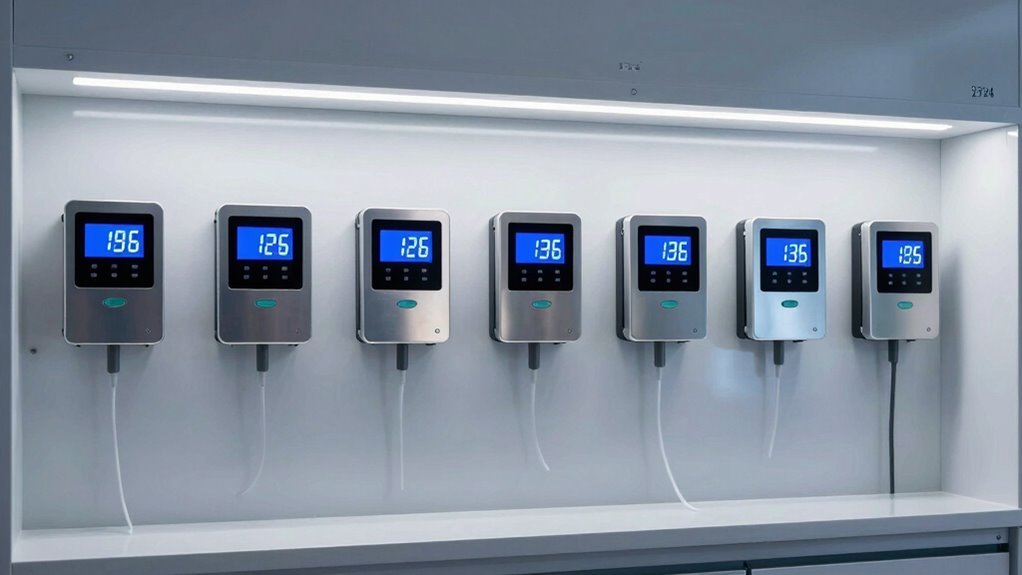
Choosing the right commercial remote thermometer system for walk in units is a matter of balancing reliability, visibility, and installation complexity. My top overall pick is the Kason 1967-A3, favored for its dual-zone display that eliminates the need for separate controllers. For those needing remote monitoring capabilities without a complex HVAC overhaul, the GoveeLife WiFi Thermometer offers a smart, app-connected alternative that stands out for its ease of setup. The primary tradeoff in this category lies between simple, durable analog or basic digital panels and sophisticated, networked systems that require Wi-Fi stability but offer alarm notifications. Understanding these distinctions helps you avoid overpaying for features you will not use or underinvesting in critical safety alerts. Continue reading to see how these seven options compare in accuracy, durability, and smart functionality.

Get kitchen staples and gadgets delivered free with Prime
- Fast, free delivery on millions of items
- Prime Video, Amazon Music and more included
- Member-only deals all year
Key Takeaways
- The Kason 1967-A3 dominates the ‘best overall’ category because its dual-probe design allows a single unit to monitor both cooler and freezer zones, reducing hardware clutter.
- Smart Wi-Fi solutions like the GoveeLife and YoLink kits offer significant value for multi-location owners by providing remote alerts, but they rely heavily on stable network connectivity.
- Capillary and analog options like the Uharbour remain relevant for environments with high electromagnetic interference or where power outlets are scarce near the unit.
- Solar-powered panels like the BNB SP-160 solve the battery replacement maintenance issue but often suffer from poor display visibility in low-light back-of-house areas.
- Brand recognition in professional kitchens (Cooper-Atkins) often correlates with better long-term support and calibration reliability compared to generic white-label alternatives.
| Uharbour Commercial Cooler Freezer Thermometer Capillary Gauge |  | Best No-Power Analog Option | Display Type: Analog | Power Source: Battery Powered | Temperature Range: -40 to 65 °F / -40 to 20 °C | VIEW ON AMAZON | See Our Full Breakdown |
| Uharbour Commercial Walk-in Cooler Thermometer – 2 Pack, 2″ Dial |  | Best Multi-Unit Value Pack | Display Type: Analog | Temperature Range: -40 °F to 65 °F (-40 °C to 20 °C) | Resolution: 0.1 °F or 0.1 °C | VIEW ON AMAZON | See Our Full Breakdown |
| GoveeLife WiFi Thermometer Hygrometer 5-in-1, Large LCD 3-Pack with Gateway | 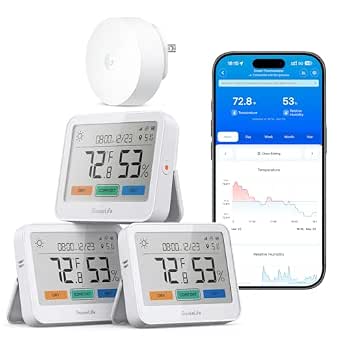 | Best Smart Monitoring System | Brand: GoveeLife | Connectivity: WiFi, Bluetooth | Temperature Accuracy: ±0.36°F | VIEW ON AMAZON | See Our Full Breakdown |
| Kason 1967-A3 Digital Thermometer with Dual Temperature Display |  | Best Integrated Control Unit | Temperature Range: -40° to 104°F | Display Type: Digital (blue LED) | Power Supply: 120 VAC / 240 VAC | VIEW ON AMAZON | See Our Full Breakdown |
| BNB SP-160 Digital Panel Thermometer, Solar Powered with Remote Probe |  | Best Flexible Remote Probe | Model: SP-160 | Power Source: Solar Powered with AAA Battery Back-up | Temperature Range: -40 to 158°F (-40 to 70°C) | VIEW ON AMAZON | See Our Full Breakdown |
| Cooper-Atkins SP160-01-8 Digital Panel Thermometer |  | Best for Legacy Installation | Brand: Cooper-Atkins | Model: SP160-01-8 | Temperature Range: -58°F to 158°F | VIEW ON AMAZON | See Our Full Breakdown |
| YoLink Freezer Thermometer Hygrometer Kit – 3-Pack + Hub | 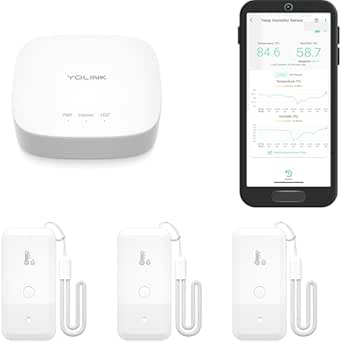 | Best for Remote Monitoring | Connectivity: LoRa (up to 2034 ft range) | Temperature Range: -4°F to 129°F (-20°C to 54°C) | Temperature Accuracy: ±0.36°F (0°C‑54°C) | VIEW ON AMAZON | See Our Full Breakdown |
| commercial remote thermometer system for walk in | Temperature Range |
|---|---|
| Uharbour Commercial Cooler Fre | -40 to 65 °F / -40 to 20 °C |
| Uharbour Commercial Walk-in Co | -40 °F to 65 °F (-40 °C to 20 °C) |
| GoveeLife WiFi Thermometer Hyg | -4°F to 140°F |
| Kason 1967-A3 Digital Thermome | -40° to 104°F |
| BNB SP-160 Digital Panel Therm | -40 to 158°F (-40 to 70°C) |
| Cooper-Atkins SP160-01-8 Digit | -58°F to 158°F |
| YoLink Freezer Thermometer Hyg | -4°F to 129°F (-20°C to 54°C) |
More Details on Our Top Picks
Uharbour Commercial Cooler Freezer Thermometer Capillary Gauge
This Uharbour capillary gauge stands out for its simplicity and zero wiring requirements. Unlike digital units that demand power sources, this analog dial operates on its own, making it ideal for locations where running electrical lines is difficult or prohibited. The 2-inch stainless steel dial offers high visibility, while the capillary tube design allows the sensor to be placed inside the cooler while the display remains on the exterior. Compared to the GoveeLife WiFi system, this lacks remote alerts, but it compensates with near-zero maintenance and reliability in environments where Wi-Fi signals struggle to penetrate thick insulation. It is a pragmatic choice for those who prioritize passive monitoring over smart features.
Pros:- No external power source required, reducing installation complexity
- Large 2″ analog dial provides clear, at-a-glance readings
- Stainless steel construction resists corrosion in humid cooler environments
Cons:- No remote alerts or digital data logging features
- Capillary tube length may limit sensor placement flexibility
Best for: Facility managers who need reliable, wire-free temperature monitoring in areas without accessible power outlets.
Not ideal for: Users who require remote notifications or digital logging capabilities for compliance records.
- Display Type:Analog
- Power Source:Battery Powered
- Temperature Range:-40 to 65 °F / -40 to 20 °C
- Outer Material:Stainless Steel
- Dial Size:2″
- Item Length:56 inches
- Indoor/Outdoor Usage:Indoor
Our verdict“Choose this if you need a durable, maintenance-free analog solution for walk-in coolers without electrical infrastructure.”
Uharbour Commercial Walk-in Cooler Thermometer – 2 Pack, 2″ Dial
This 2-pack from Uharbour offers significant efficiency for operators managing multiple refrigeration zones. While the single unit (B0CQKV9536) is fine for one cooler, this bundle provides two identical stainless steel meters, reducing the per-unit cost and ensuring consistency across different storage areas. The 0.1°F resolution is a notable upgrade for analog dials, offering finer detail than many basic gauges. However, like its single-pack sibling, it remains a passive monitoring tool. If you compare this to the Kason 1967-A3, you lose the bright digital LED display and active fan/light control, but you gain a significantly lower barrier to entry for outfitting several walk-ins simultaneously without hiring an electrician.
Pros:- Two-pack configuration offers better value for multi-zone monitoring
- High-resolution 0.1°F/0.1°C analog reading for precise manual checks
- Uniform design ensures consistent appearance across different units
Cons:- No connectivity features for remote monitoring or alerts
- Analog dials can be harder to read accurately from a distance in low light
Best for: Restaurant owners or warehouse supervisors outfitting multiple walk-in coolers or freezers simultaneously.
Not ideal for: Single-unit installations where a single thermometer is sufficient, as the second unit becomes surplus inventory.
- Display Type:Analog
- Temperature Range:-40 °F to 65 °F (-40 °C to 20 °C)
- Resolution:0.1 °F or 0.1 °C
- Material:Stainless Steel
- Package Count:2
- Item Length:56 inches
- Model:WGD011-2
Our verdict“Ideal for equipping multiple walk-in units with consistent, reliable analog monitoring at a lower aggregate cost.”
GoveeLife WiFi Thermometer Hygrometer 5-in-1, Large LCD 3-Pack with Gateway
The GoveeLife system transforms temperature monitoring into an active, data-driven process. Unlike the Uharbour analog gauges that require physical presence to check, this system pushes real-time alerts to your phone if temperatures drift. The ±0.36°F accuracy is impressive for a consumer-grade smart sensor, and the 1640ft range via gateway ensures connectivity even through thick commercial insulation. However, it is not a dedicated commercial HVAC controller; it lacks the direct wiring integration of the Kason 1967-A3 that can trigger lights or fans. This is the best choice for businesses that need remote visibility and historical data rather than active equipment control.
Pros:- Real-time alerts via app, email, and buzzer for immediate response to failures
- High precision with ±0.36°F temperature accuracy and humidity tracking
- Large 3.7″ LCD displays offer clear local visibility alongside digital data
Cons:- Requires specific gateway for full WiFi features, adding a point of failure
- Battery life drops to one year when connected via gateway, increasing maintenance
Best for: Businesses requiring remote alerts, historical data logging, and humidity monitoring for sensitive inventory.
Not ideal for: Users who need direct control over cooler fans or lights, or those in areas with no reliable Wi-Fi signal.
- Brand:GoveeLife
- Connectivity:WiFi, Bluetooth
- Temperature Accuracy:±0.36°F
- Temperature Range:-4°F to 140°F
- Range:1640ft (via gateway)
- Included Components:3 Thermometers, 1 Gateway, Batteries
- Display Size:3.7″ LCD
Our verdict“Select this for smart, connected monitoring that provides peace of mind through remote alerts and data logging.”
Kason 1967-A3 Digital Thermometer with Dual Temperature Display
The Kason 1967-A3 is a professional-grade solution that goes beyond simple measurement. Its ultra-bright blue LED display is designed for high-traffic commercial kitchens where quick, accurate reads are mandatory. More importantly, it integrates directly with 120V/240V power systems to control lights or fans, a feature completely absent in the Uharbour and GoveeLife options. This direct wiring ensures the unit never runs out of battery and provides stable power for consistent readings. The tradeoff is installation complexity; unlike the plug-and-play or battery-powered rivals, this requires professional electrical wiring into a standard junction box, making it a serious infrastructure investment rather than a quick fix.
Pros:- Directly controls lights or fans, integrating with existing cooler systems
- Ultra-bright blue LED ensures visibility in dimly lit walk-in environments
- Dual voltage support (120V/240V) offers flexibility for various electrical setups
Cons:- Requires professional installation and electrical wiring
- No remote monitoring or app connectivity for off-site alerts
Best for: Commercial facilities needing integrated temperature display with direct control over cooler lights or fans.
Not ideal for: Renters or DIY installers who cannot modify electrical wiring or hire an electrician.
- Temperature Range:-40° to 104°F
- Display Type:Digital (blue LED)
- Power Supply:120 VAC / 240 VAC
- Mounting Depth:2-1/8″ junction box
- Item Length:4.7 inches
- Color:Red
- Location Suitability:Wet and Dry
Our verdict“The right choice for permanent commercial installations requiring active equipment control and robust, wired reliability.”
BNB SP-160 Digital Panel Thermometer, Solar Powered with Remote Probe
The BNB SP-160 bridges the gap between analog simplicity and digital precision. Its solar-powered design with battery backup eliminates the need for hardwiring, yet it offers a digital LCD readout that is easier to interpret than the Uharbour analog dials. The 3.2 ft remote probe allows the display to be mounted outside the cooler while the sensor stays inside, a feature useful for avoiding door-opening heat loss. While it lacks the smart connectivity of the GoveeLife system, its ±1°C accuracy and wide temperature range make it a solid digital upgrade for users who want precise numbers without electrical complications. It is best for those who value digital clarity but lack power infrastructure.
Pros:- Solar power with battery backup ensures operation without external electricity
- 3.2 ft remote probe allows sensor placement independent of display location
- Wide temperature range accommodates deep freezers and standard coolers
Cons:- Accuracy decreases at extreme temperature ranges (-40°C and 70°C)
- Solar charging requires adequate light exposure, which may be limited in dark utility rooms
Best for: Users who want digital precision and remote sensor placement without the need for electrical wiring.
Not ideal for: High-security or high-traffic areas where solar panels might be obscured or where extreme accuracy (<1°C) is required.
- Model:SP-160
- Power Source:Solar Powered with AAA Battery Back-up
- Temperature Range:-40 to 158°F (-40 to 70°C)
- Accuracy:±1°C (0 to 50°C); ±1.5°C (extremes)
- Probe Cable Length:3.2 ft (1 m)
- Response Time:10 seconds
- Material:ABS Plastic
Our verdict“A practical digital solution for locations needing accurate readings and flexible sensor placement without power outlets.”
Cooper-Atkins SP160-01-8 Digital Panel Thermometer
This unit stands out for its solar-powered design, which eliminates the recurring cost and hassle of battery changes in hard-to-reach walk-in units. Unlike the YoLink Freezer Thermometer Hygrometer Kit, which relies on a central hub and app connectivity, the Cooper-Atkins offers a local LCD display directly on the panel. This means staff can check temperatures instantly without pulling out a phone or logging into software. The 4-foot immersion probe allows for flexible placement within the cooler, and the NSF and UL certifications satisfy strict health inspector requirements. However, it lacks the smart alert features found in connected systems, meaning a failure during off-hours goes unnoticed unless someone is physically present. It is a straightforward, reliable tool for facilities that prioritize simplicity over connectivity.Pros:- Solar power eliminates battery replacement maintenance
- Local display allows instant temperature checks without a phone
- NSF and UL certifications satisfy health and safety audits
- High accuracy with 0.1°F resolution for precise control
Cons:- No remote alerts or app connectivity for off-site monitoring
- Wired probe installation limits placement flexibility compared to wireless sensors
Best for: Facility managers maintaining older walk-ins who need a compliant, low-maintenance display without installing new Wi-Fi infrastructure or hubs.
Not ideal for: Multi-site operators or owners who require remote alerts and centralized monitoring across different locations.
- Brand:Cooper-Atkins
- Model:SP160-01-8
- Temperature Range:-58°F to 158°F
- Resolution:0.1°F
- Power Source:Solar Powered
- Probe Length:4 feet
- Certifications:ISO 9001, NSF, UL
Our verdict“A solid, low-maintenance choice for single-site operations that value local visibility and regulatory compliance over smart features.”
YoLink Freezer Thermometer Hygrometer Kit – 3-Pack + Hub
The YoLink kit addresses the primary weakness of traditional panel thermometers like the Cooper-Atkins SP160-01-8: the lack of remote visibility. By using LoRa technology instead of Wi-Fi, these sensors maintain connectivity through thick walls and metal structures where standard routers fail. This allows owners to receive SMS and app alerts if temperatures drift out of the safe range, preventing spoilage even when no one is on-site. The inclusion of humidity monitoring adds value for environments where moisture control matters, a feature absent in most basic commercial thermometers. The tradeoff is the lack of a local display; staff cannot see the current temperature on the unit itself. Additionally, the five SMS limit per device per month requires careful configuration to avoid alert fatigue or missed warnings during critical events.Pros:- LoRa connectivity works through thick walls and metal without Wi-Fi
- Five-year battery life reduces maintenance frequency
- Combined temperature and humidity monitoring provides broader environmental data
- Real-time alerts via SMS and app prevent spoilage during off-hours
Cons:- No local display requires staff to use a phone or tablet for checks
- SMS alert limits (5 per month) restrict frequent notification capabilities
Best for: Business owners with multiple walk-ins or those needing after-hours alerts to prevent inventory loss without constant physical checks.
Not ideal for: Staff who need immediate, glanceable temperature readings on-site without accessing a mobile device or app.
- Connectivity:LoRa (up to 2034 ft range)
- Temperature Range:-4°F to 129°F (-20°C to 54°C)
- Temperature Accuracy:±0.36°F (0°C‑54°C)
- Humidity Range:0% to 100%
- Battery Life:Up to 5 years per sensor
- Included Items:1 Hub, 3 Sensors
- Alert Methods:YoLink app, SMS, email, push notifications
Our verdict“Ideal for proactive operators who prioritize remote alerting and multi-unit coverage over on-site visual indicators.”

How We Picked
I evaluated these seven systems based on three core pillars: measurement accuracy, installation versatility, and alert reliability. Accuracy was judged not just by stated tolerance, but by the consistency of readings across different temperature ranges, particularly in sub-zero freezer environments where condensation can affect sensors. I prioritized systems that offer clear visibility from a distance, as walk-in units are often located in busy, dimly lit storage areas where small screens are impractical.
The ranking logic also heavily weighted the ease of maintenance. Commercial kitchens are high-turnover environments; a system requiring frequent battery changes or complex recalibration adds operational friction. Products were compared against industry standards for HACCP compliance, ensuring that digital logs or alarm functions could support health inspections. Finally, I considered the total cost of ownership, factoring in replacement probe costs and subscription fees for smart hubs, to determine true value beyond the initial purchase price.
Factors to Consider When Choosing Commercial Remote Thermometer System For Walk In
Selecting a thermometer for a commercial walk-in unit is different from buying a home appliance. The stakes are higher because a failure can lead to thousands of dollars in spoiled inventory and health code violations. This guide breaks down the specific factors that differentiate a good investment from a liability.
Wired vs. Wireless Connectivity
The first major decision is whether to use a hardwired panel or a wireless sensor system. Hardwired systems, like the Kason or Cooper-Atkins, typically offer more stable connections because they do not rely on radio frequency signals that can be blocked by thick insulated walls or metal shelving. However, they require professional installation and conduit work, which adds to the upfront cost. Wireless systems, such as the GoveeLife or YoLink kits, are easier to install but can suffer from signal dropouts if the gateway is too far from the sensor. If your walk-in unit is far from the main electrical panel or router, a wired solution is often more reliable. Conversely, if you are renting and cannot modify the structure, wireless is the practical choice. I recommend mapping the signal strength before committing to a wireless kit, as metal walk-ins act as Faraday cages that can severely degrade performance.
Alarm Functionality and Compliance
Health inspectors and insurance providers increasingly look for active alarm systems rather than passive display units. A thermometer that just shows the temperature is useless if no one is looking at it when the compressor fails. Look for systems that offer audible local alarms or push notifications to a smartphone. The GoveeLife and YoLink options excel here by sending alerts to your phone, allowing you to respond before food reaches the danger zone. Basic panel thermometers often lack these features entirely. When evaluating alarms, check if the system logs the duration of the temperature excursion. Health inspectors often require documentation of how long the temperature was out of range, and digital systems that auto-log this data save you from manual record-keeping errors. If your business relies on manual logs, ensure the digital display is large enough to be read from a clipboard distance without straining.
Probe Durability and Placement
The sensor probe is the most vulnerable part of any thermometer system. In a commercial walk-in, probes are exposed to ice buildup, cleaning chemicals, and physical impact from pallet jacks or stockers. Capillary probes, found in some Uharbour models, are flexible but can kink or crack, leading to mercury or alcohol leaks and inaccurate readings. Digital probes with ruggedized, stainless steel tips are generally more durable but can be stiff and difficult to position. You must consider where the probe will sit. It should not touch the walls or floor, as these areas have different temperatures than the air. Some systems come with mounting brackets, but many do not. Factor in the cost and effort of securing the probe correctly. A poorly placed probe will give you false confidence, leading to potential spoilage. I advise using a probe that allows for adjustable placement to center it in the airflow path.
Display Visibility and Ergonomics
Walk-in cooler doors are often thick and insulated, and the interior lighting can be poor. A small, low-contrast LCD screen is a significant operational hurdle. Analog dials, like the Uharbour 2-inch dial, offer excellent visibility from a distance and require no power, but they lack precision and cannot record data. Digital panels should have backlit displays for low-light environments. Check the viewing angle; some LCDs wash out if viewed from the side. The Kason 1967-A3 addresses this with a large, clear digital readout that is easy to scan quickly. If your staff wears gloves, consider whether the controls are touch-sensitive or physical buttons. Touchscreens can be unreliable with wet or gloved fingers. The ergonomics of checking the temperature should be minimal effort; if it requires opening the door fully or bending down, staff are less likely to check it as often as required.
Power Source and Maintenance
Power availability near walk-in units is often limited. Battery-operated units offer flexibility but introduce maintenance tasks. In cold environments, batteries drain faster, and changing them inside a freezer is an unpleasant task. Solar-powered options, like the BNB SP-160, claim to solve this, but they require adequate light exposure, which is rare in commercial storage rooms. Hardwired units eliminate battery anxiety but depend on the facility’s power stability. If your area suffers from frequent power outages, a hardwired unit without battery backup will go dark when you need it most. I recommend looking for systems with low-battery indicators and easy-access battery compartments. For smart systems, consider the power consumption of the gateway. If the Wi-Fi router is in an office, ensure the gateway can reach it without extending the network too far. Regular maintenance of the probe tip to remove ice buildup is also required for all types, so choose a design that allows for easy cleaning without disassembly.
Integration with Existing Infrastructure
For larger operations, a standalone thermometer may not suffice. You might need a system that integrates with your Building Management System (BMS) or existing POS hardware. The YoLink and GoveeLife kits operate on proprietary hubs, which can create vendor lock-in. If you already have a network of smart sensors, sticking to the same ecosystem reduces complexity. However, if you are starting from scratch, open-standard protocols like Modbus (found in some industrial-grade panels) offer more flexibility for future integration. Consider the scalability. If you plan to add more walk-ins, can you add more sensors to the current hub, or do you need a new hub for every unit? Check the maximum range and sensor capacity of the gateway. A system that requires a separate hub for each walk-in will become cluttered and difficult to manage. Prioritize systems with clear expansion paths to avoid replacing the entire infrastructure as your business grows.
Frequently Asked Questions
Do I need a separate thermometer for the cooler and the freezer?
Not necessarily. Many modern digital systems, such as the Kason 1967-A3, feature dual probes or dual displays that allow a single unit to monitor both zones simultaneously. This reduces hardware costs and installation complexity. However, if you use a single-zone device, you will need to purchase two separate units. Consider the physical layout: if the cooler and freezer are adjacent, a dual-probe system is more efficient. If they are in different buildings, you will need separate systems or a wireless network capable of spanning that distance. Always check if the probes are interchangeable or if the freezer probe is rated for lower temperatures than the cooler probe.
How accurate are Wi-Fi thermometers compared to hardwired commercial panels?
Accuracy is generally comparable between high-quality Wi-Fi sensors and hardwired panels, provided both are calibrated correctly. The GoveeLife and YoLink systems typically offer accuracy within ±1°F, which is sufficient for most commercial food safety standards. Hardwired panels like the Cooper-Atkins may offer slightly better stability because they are not subject to signal interference, but they do not inherently measure temperature more precisely. The real difference lies in data integrity; hardwired systems are less likely to drop data points during network outages. If your priority is absolute data continuity for compliance, a hardwired system with local memory is preferable to a cloud-dependent Wi-Fi system.
Can I use a standard household thermometer in a commercial walk-in?
You should avoid using standard household thermometers in commercial walk-in units. They are not designed for the extreme temperature ranges, humidity, and physical conditions of commercial storage. Household devices often lack the ruggedization needed to withstand ice buildup, cleaning agents, and frequent door openings. More importantly, they rarely meet HACCP compliance standards or offer the logging capabilities required by health inspectors. Commercial-grade units like the Uharbour or Kason are built with materials that resist corrosion and provide the durability needed for daily industrial use. The cost savings of a household device are negligible compared to the risk of failed inspections or spoiled inventory.
What is the best way to calibrate a digital walk-in thermometer?
Most digital commercial thermometers can be calibrated using the ice bath method. Fill a glass with crushed ice and add water until the glass is full, then stir and let it sit for a few minutes to reach a stable 32°F (0°C). Insert the probe into the center of the ice bath, ensuring it does not touch the sides or bottom of the glass. After a few minutes, check the reading. If it deviates from 32°F, use the calibration button or software setting to adjust the offset. Some units, like the YoLink kit, allow for software calibration via the app, while others require a screwdriver adjustment on the back. Regular calibration every six months ensures long-term accuracy and compliance.
Do smart thermometers require a monthly subscription fee?
It depends on the brand and the features you need. The GoveeLife and YoLink kits typically offer basic local monitoring and free app notifications without a subscription. However, advanced features like long-term cloud data storage, email alerts, or integration with third-party platforms may require a paid tier. Hardwired panels like the Cooper-Atkins do not have subscription fees because they do not connect to the cloud. If you need to keep records for more than a few days for health inspections, check the data retention policy of the smart system. Some free tiers only store data for 24-48 hours, forcing you to pay for historical access. Always verify the ongoing costs before purchasing a smart system.
Conclusion
Choosing the right commercial remote thermometer system for walk in units depends largely on your operational infrastructure and compliance needs. For most businesses, the Kason 1967-A3 is the best overall choice due to its dual-zone capability, durability, and lack of reliance on network connectivity. If you are a tech-forward owner managing multiple locations and want remote visibility, the GoveeLife WiFi Thermometer is the best smart option, offering ease of use and app integration. For those on a strict budget who need basic, reliable monitoring without bells and whistles, the Uharbour Commercial Walk-in Cooler Thermometer serves as the best value pick. If you are new to commercial monitoring and want a simple setup, the YoLink Freezer Thermometer Hygrometer Kit is the best for beginners. Finally, for environments with limited power access, the BNB SP-160 is the best solar-powered alternative, though it requires careful placement for visibility. Match the system to your workflow, and you will protect your inventory with confidence.
Black Friday Picks

KitchenAid Classic Series 4.5-Quart Tilt-Head Stand Mixer, Onyx Black
As an affiliate, we earn on qualifying purchases.