For a restaurant that needs dependable WiFi across dining rooms, kitchen areas, and patios, I’d start with the TP-Link Deco X50-PoE: its PoE design can simplify placement where power outlets are limited. The Deco XE75 is a stronger fit when a busy venue needs tri-band mesh capacity, while the WAVLINK AX1800 Outdoor offers a purpose-built weatherproof option for extending coverage outside. The main tradeoff is between simple plug-in extenders, coordinated mesh systems, and access points that can offer more placement control but may take more network planning. Restaurant layout, wall materials, client load, and whether guest WiFi needs separation all affect the right choice. Read on for the full comparison and guidance on matching each option to your venue.

Get kitchen staples and gadgets delivered free with Prime
- Fast, free delivery on millions of items
- Prime Video, Amazon Music and more included
- Member-only deals all year
Key Takeaways
- PoE placement is a practical advantage for restaurants: the Deco X50-PoE and Omada access points can be installed where WiFi coverage is needed without relying on a nearby power outlet.
- Mesh kits and range extenders solve different problems. Deco systems create a coordinated network across nodes, while the AX3000 and AC-series extenders are add-ons for a router that already serves most of the venue.
- Outdoor ratings matter for patios. The WAVLINK AX1800, eero Outdoor 7, and Omada EAP225-Outdoor are designed for outdoor use; indoor mesh nodes should not be treated as weatherproof patio hardware.
- Tri-band is a targeted upgrade, not a universal fix. The Deco XE75 adds a dedicated 6 GHz band, but walls, client compatibility, and node placement can limit how much a restaurant benefits.
- Large coverage claims do not replace a site plan. Thick walls, kitchen equipment, building layout, and simultaneous guest and staff traffic can matter more than headline area figures.
| TP-Link AX3000 WiFi 6 Range Extender with Dual Band, Gigabit Ethernet, and EasyMesh Compatibility |  | Best Standalone Extender for Existing Routers | WiFi standard: WiFi 6 (802.11ax) | Bands: Dual-band | Maximum listed speed: 2404 Mbps on 5 GHz; 574 Mbps on 2.4 GHz | VIEW ON AMAZON | See Our Full Breakdown |
| WAVLINK AX1800 Outdoor WiFi 6 Extender Long Range IP67 Weatherproof |  | Best for Outdoor Dining Areas | WiFi standard: 802.11ax | Frequency bands: Dual-band | Listed data rate: 1.8 Gbps | VIEW ON AMAZON | See Our Full Breakdown |
| TP-Link Deco M5 Mesh WiFi System 3-Pack | 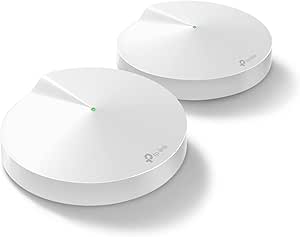 | Best Value Mesh for Broad Basic Coverage | Coverage: Up to 5,500 sq. ft. | Units: 3 | WiFi bands: Dual-band, 2.4 GHz and 5 GHz | VIEW ON AMAZON | See Our Full Breakdown |
| TP-Link AX3000 PoE Mesh WiFi 6 Deco X50-PoE (3-Pack) | 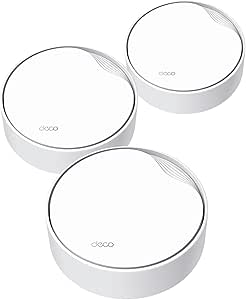 | Best for Restaurant-Grade Placement Flexibility | WiFi standard: WiFi 6 (802.11ax), also supports 802.11ac | Bands: Dual-band | Maximum listed speed: Up to 3 Gbps | VIEW ON AMAZON | See Our Full Breakdown |
| TP-Link Deco XE75 AXE5400 Tri-Band WiFi 6E Mesh System, 3-Pack |  | Best Premium Mesh for High Device Demand | WiFi bands: Tri-band: 6 GHz, 5 GHz, and 2.4 GHz | Total listed speed: 5400 Mbps | Coverage: Up to 7,200 sq. ft. | VIEW ON AMAZON | See Our Full Breakdown |
| TP-Link Deco S4 Mesh WiFi System (3-Pack) |  | Best Overall for Dining Areas and Adjacent Rooms | Units: 3 | Listed coverage: Up to 5,500 sq. ft. | Wi-Fi generation: Wi-Fi 5 | VIEW ON AMAZON | See Our Full Breakdown |
| 2026 WiFi Extender Internet Booster, 10000 Sq.ft Long Range Repeater Wireless Routers Amplifier |  | Best for Basic, Low-Cost-Labor Expansion | Advertised coverage: Up to 10,000 sq. ft. | External antennas: 4 | Listed device capacity: 65+ devices | VIEW ON AMAZON | See Our Full Breakdown |
| TP-Link AC1900 WiFi Range Extender RE550 |  | Best Single-Extender Pick for a Medium-Sized Space | Wi-Fi class: AC1900 | Frequency bands: Dual-band | Maximum listed band rates: Up to 1,300 Mbps on 5 GHz and 600 Mbps on 2.4 GHz | VIEW ON AMAZON | See Our Full Breakdown |
| TP-Link AC1200 WiFi Extender Dual Band (RE315) |  | Best Compact Choice for a Small Café | Wireless standard: 802.11a/b/g/n/ac | Wi-Fi class: AC1200 | Frequency bands: Dual-band | VIEW ON AMAZON | See Our Full Breakdown |
| Omada AX3000 Wireless Access Point with DC Adapter and 5-Year Warranty |  | Best for Managed Restaurant Wi-Fi | Wireless technology: Wi-Fi 6 | Maximum listed speed: 2,976 Mbps | Management: Cloud-based with Omada app | VIEW ON AMAZON | See Our Full Breakdown |
| TP-Link Deco X55 AX3000 WiFi 6 Mesh System (3-Pack) |  | Best Overall for Indoor Dining Areas | Wi-Fi standard: Wi-Fi 6 (AX3000) | Pack size: 3 units | Listed speed: 2402 Mbps (5 GHz) + 574 Mbps (2.4 GHz) | VIEW ON AMAZON | See Our Full Breakdown |
| TP-Link Omada EAP610 V2 AX1800 Wireless Access Point |  | Best for Managed Restaurant Networks | Model: EAP610 V2 | Wi-Fi standard: Wi-Fi 6 (802.11ax) | Maximum speed: 1800 Mbps | VIEW ON AMAZON | See Our Full Breakdown |
| eero Outdoor 7 Dual-Band Mesh Wi-Fi Router (Newest Model) – Weatherproof IP66, Coverage up to 15,000 sq. ft., Includes 30W PoE+ Adapter |  | Best Premium Outdoor Coverage | Wi-Fi technology: Wi-Fi 7 (IEEE 802.11a/b/g/n/ac/ax) | Coverage: Up to 15,000 sq. ft. | Operating temperature: -40°F to 131°F | VIEW ON AMAZON | See Our Full Breakdown |
| Omada AC1200 Outdoor Wireless Access Point with PoE Injector (EAP225-Outdoor) |  | Best Value Outdoor Access Point | Model: EAP225-Outdoor | Wi-Fi generation: Wi-Fi 5 | Wireless speed: 1200 Mbps | VIEW ON AMAZON | See Our Full Breakdown |
| Deco 7 Dual-Band BE5000 WiFi 7 Mesh Wi-Fi System 4-Stream 5 Gbps, 240 Mhz |  | Best Wi-Fi 7 Upgrade for Indoor Sites | Wi-Fi standard: Wi-Fi 7 | Streams: 4-stream, dual-band | Listed speed: Up to 4324 Mbps (5 GHz) + 688 Mbps (2.4 GHz) | VIEW ON AMAZON | See Our Full Breakdown |
More Details on Our Top Picks
TP-Link AX3000 WiFi 6 Range Extender with Dual Band, Gigabit Ethernet, and EasyMesh Compatibility
For a restaurant that already has a working router but needs to push coverage into a dining area or back office, I’d start with this WiFi 6 range extender. Its dual-band capability and two directional antennas give it a stronger coverage-focused role than replacing the network with a new mesh system. Gigabit Ethernet can also connect a fixed device, such as a point-of-sale terminal, over a wired link. Compared with the Deco X50-PoE, this is a simpler add-on rather than a coordinated three-node system, so it may suit a small venue with one coverage gap. The tradeoff is that an extender relies on the source router’s signal and won’t increase the internet connection’s speed. It also isn’t compatible with Deco mesh systems, so I’d skip it if you want one unified network built around Deco.
Pros:- WiFi 6 dual-band support for extending an existing network
- Two directional antennas focus coverage toward a target area
- Gigabit Ethernet supports a wired connection for a fixed device
- EasyMesh and OneMesh support can help expand compatible networks
Cons:- Extends the router’s coverage but does not increase the internet service speed
- Not compatible with TP-Link Deco mesh systems
- Best suited to a localized coverage gap rather than a multi-zone restaurant
Best for: Small restaurants with an existing compatible router and one weak-signal area, such as a back office or a far corner of the dining room.
Not ideal for: Restaurants planning a full mesh deployment, especially those using a Deco system, or venues that need coordinated coverage across several rooms.
- WiFi standard:WiFi 6 (802.11ax)
- Bands:Dual-band
- Maximum listed speed:2404 Mbps on 5 GHz; 574 Mbps on 2.4 GHz
- Ethernet:Gigabit Ethernet port
- Antennas:2 high-gain directional antennas
- Mesh compatibility:EasyMesh and OneMesh
- Setup:TP-Link Tether app
Our verdict“Choose this extender when a small restaurant needs to fill one dead zone without replacing its existing router.”
WAVLINK AX1800 Outdoor WiFi 6 Extender Long Range IP67 Weatherproof
When restaurant service extends to a patio, courtyard, or outdoor seating area, the IP67 weatherproof enclosure gives this WAVLINK extender a clear purpose the indoor models here don’t share. Its four omni-directional antennas and listed range of up to 300 meters are aimed at spreading coverage outdoors, while PoE support can simplify powering a mounted unit when a suitable cable run is available. Compared with the TP-Link AX3000 range extender, it is a better fit for exposed locations, not a general indoor upgrade. The tradeoff is installation: the device weighs 2255 g, needs sturdy mounting, and its PoE adapter is not waterproof, so that adapter must stay indoors. I’d also plan placement carefully to limit water exposure at connections. Skip it if the problem is inside the dining room or you need a turnkey indoor mesh system.
Pros:- IP67 weatherproof rating suits outdoor installation
- Four 8 dBi omni-directional antennas spread signal across an outdoor area
- Supports WiFi 6 dual-band operation with a listed data rate of 1.8 Gbps
- 802.3 AF/AT and passive PoE options provide installation flexibility
Cons:- PoE adapter is not waterproof and must be installed indoors
- At 2255 g, it needs a sturdy mounting surface
- Outdoor connections and placement need careful attention to reduce water-ingress risk
Best for: Restaurants with a patio, garden, or other outdoor customer area that needs WiFi from an indoor router.
Not ideal for: Venues seeking a simple indoor extender or a complete coordinated mesh network without outdoor mounting and cable planning.
- WiFi standard:802.11ax
- Frequency bands:Dual-band
- Listed data rate:1.8 Gbps
- Antennas:4 × 8 dBi omni-directional fiberglass antennas
- Listed range:Up to 300 meters
- PoE:802.3 AF/AT and passive PoE
- Operating temperature:-20°C to 50°C
- Weight:2255 g
Our verdict“Pick the WAVLINK for outdoor restaurant seating where weather protection and flexible PoE installation matter more than indoor mesh features.”
TP-Link Deco M5 Mesh WiFi System 3-Pack
The Deco M5 three-pack makes sense for a restaurant that needs a single network across several indoor zones rather than a one-room signal boost. Its stated coverage of 5,500 square feet and seamless roaming are useful when staff and guests move between dining areas, though real coverage depends on walls and placement. Each unit has two Ethernet ports, giving the system some flexibility for wired devices or backhaul. Compared with the Deco X50-PoE, the M5 is the more basic dual-band option: it lacks the newer WiFi 6 and PoE installation features, but it still offers a multi-unit mesh layout. That also means it is less suited to ceiling mounting or demanding, high-device-count deployments. I’d choose it for broad, straightforward indoor coverage, not for a venue that needs advanced mounting flexibility or the fastest listed throughput.
Pros:- Three units provide stated coverage up to 5,500 square feet
- Seamless roaming uses a single network name across the mesh
- Two Ethernet ports per unit support wired devices or backhaul
- App setup, built-in security, and parental controls are included
Cons:- Dual-band WiFi and a listed maximum rate of 1300 Mbps are less capable than newer WiFi 6 mesh options
- Requires a modem for internet service
- Three-unit system may not cover very large or unusually divided venues
Best for: Small to midsize restaurants that want a simple three-node indoor mesh and broad coverage across dining and staff areas.
Not ideal for: Restaurants with high client density, a need for ceiling-mounted access points, or a preference for WiFi 6 and PoE-powered installation.
- Coverage:Up to 5,500 sq. ft.
- Units:3
- WiFi bands:Dual-band, 2.4 GHz and 5 GHz
- Maximum listed data rate:1300 Mbps
- Ethernet ports:2 per unit; 6 total
- Security protocols:WPA-PSK and WPA2-PSK
- Control:App and Alexa
- Antennas:4 internal antennas per unit
Our verdict“Choose the Deco M5 when broad, easy indoor mesh coverage matters more than WiFi 6 speed or PoE mounting.”
TP-Link AX3000 PoE Mesh WiFi 6 Deco X50-PoE (3-Pack)
The Deco X50-PoE three-pack is the most installation-flexible indoor mesh choice here for a restaurant that can run Ethernet to ceiling or hard-to-reach locations. PoE lets a compatible switch power the nodes through the network cable, which can reduce the need for outlets near access points; the 2.5 Gbps ports also give wired connections room to exceed ordinary gigabit speeds when the rest of the network supports it. Compared with the Deco M5, this system adds WiFi 6, greater stated coverage at 6,500 square feet, and PoE. The cost of that capability is added infrastructure: PoE functionality requires a PoE+ switch, which is not included, and most internet setups still need a modem. I’d pass if you can’t provide that equipment or only need to fill one small dead zone.
Pros:- WiFi 6 mesh provides a coordinated network across three units
- PoE supports ceiling and hard-to-reach placement when paired with suitable equipment
- Two 2.5 Gbps Ethernet ports per unit support high-speed wired links
- Stated coverage reaches up to 6,500 square feet
Cons:- PoE+ switch is required for PoE operation and is not included
- Most internet providers require a separate modem
- More equipment and installation planning than a standalone extender such as the TP-Link AX3000 range extender
Best for: Restaurants with Ethernet cabling and a PoE+ switch that need ceiling-mounted mesh nodes across multiple indoor zones.
Not ideal for: Small venues seeking a plug-in extender, or operators without Ethernet runs and the additional PoE equipment needed for flexible installation.
- WiFi standard:WiFi 6 (802.11ax), also supports 802.11ac
- Bands:Dual-band
- Maximum listed speed:Up to 3 Gbps
- Coverage:Up to 6,500 sq. ft.
- Units:3
- Ethernet ports:2 × 2.5 Gbps per unit; 6 total
- PoE:Supported; PoE+ switch not included
- Security:WPA, WPA2, WPA3, and HomeShield
- Control:Deco app and Alexa voice control
Our verdict“Choose the Deco X50-PoE if your restaurant can use wired PoE placement to create a cleaner, coordinated WiFi 6 mesh.”
TP-Link Deco XE75 AXE5400 Tri-Band WiFi 6E Mesh System, 3-Pack
For a restaurant with many connected devices and several indoor zones, the Deco XE75 three-pack is the premium mesh choice in this group. Its tri-band design adds a 6 GHz band alongside 5 GHz and 2.4 GHz, creating another band for compatible devices and mesh traffic. That can make it a stronger fit than the dual-band Deco X50-PoE when wireless backhaul is preferred and the layout has room for well-placed nodes. The stated coverage is also the largest here at 7,200 square feet. The tradeoffs are practical: client devices need WiFi 6E support to use 6 GHz, and this system doesn’t list PoE, so it offers less mounting flexibility than the X50-PoE. I’d skip it for a small venue that only needs one weak spot fixed.
Pros:- Tri-band WiFi includes 6 GHz, 5 GHz, and 2.4 GHz
- Three units provide stated coverage up to 7,200 square feet
- Deco app setup and HomeShield security are included
- Mesh system replaces a traditional router-and-extender arrangement
Cons:- 6 GHz benefits require compatible client devices
- No PoE support is listed, limiting installation options compared with the Deco X50-PoE
- Requires a modem for most internet providers and may need extra configuration for advanced setups
Best for: Restaurants with a broad indoor footprint, many connected devices, and compatible WiFi 6E clients that need a tri-band mesh.
Not ideal for: Small venues seeking a single extender, or operators who need PoE ceiling mounting and have few devices that can use 6 GHz.
- WiFi bands:Tri-band: 6 GHz, 5 GHz, and 2.4 GHz
- Total listed speed:5400 Mbps
- Coverage:Up to 7,200 sq. ft.
- Units:3
- WiFi generation:WiFi 6E
- Security:TP-Link HomeShield
- Compatibility:Compatible with all major ISPs
- Setup and control:Deco app
Our verdict“Choose the Deco XE75 for expansive indoor coverage and tri-band capacity when your devices can benefit from WiFi 6E.”
TP-Link Deco S4 Mesh WiFi System (3-Pack)
For a restaurant that needs one managed network across dining and back-of-house spaces, I rank the Deco S4 three-pack above single-unit extenders because its three nodes create a unified mesh rather than relaying a router signal from one spot. The listed coverage is up to 5,500 sq. ft., and one network name can make it easier for staff devices to stay connected as they move between nodes. Its two Ethernet ports per unit also give a manager wired connection options for compatible equipment. The tradeoff is its Wi-Fi 5 generation: the Omada AX3000 access point offers Wi-Fi 6 and more business-focused management, while the RE550 is a simpler choice for extending an existing router. The S4 is aimed at broad coverage, not restaurant-grade network segmentation or advanced site controls.
Pros:- Three nodes can cover more varied layouts than a single plug-in extender.
- A single network name supports easier movement between mesh units.
- Two Ethernet ports on each unit allow wired connections near each node.
- Deco app setup and management are geared toward less technical owners.
Cons:- Wi-Fi 5 is an older generation than the Wi-Fi 6 Omada AX3000.
- Mesh coverage claims do not account for dense walls, kitchen equipment, or busy-device loads.
- A modem is required for most internet service setups, and Ethernet cables are not included.
Best for: Small restaurants or cafés seeking a straightforward three-node network for guest and staff coverage across several rooms.
Not ideal for: Restaurants needing Wi-Fi 6, centrally managed multi-site networking, or dedicated guest and staff network controls.
- Units:3
- Listed coverage:Up to 5,500 sq. ft.
- Wi-Fi generation:Wi-Fi 5
- Wi-Fi class:AC1900
- Frequency bands:Dual-band
- Ethernet ports:6 total; 2 per unit
- Listed device capacity:Up to 100 devices
- Power:12V DC
Our verdict“Choose the Deco S4 if you want an approachable three-node mesh for a small restaurant and can accept Wi-Fi 5 rather than business-focused controls.”
2026 WiFi Extender Internet Booster, 10000 Sq.ft Long Range Repeater Wireless Routers Amplifier
This extender’s appeal is its simple WPS setup and broad compatibility claims: it may suit a small café that needs to push an existing router’s signal into one nearby dead zone without replacing the network. It lists repeater, access-point, bridge, client, and router modes, plus an Ethernet port, which offers more placement flexibility than the basic RE315. But the advertised 10,000 sq. ft. coverage and 80% speed claim come without supporting technical specifications here, so I would not use them to plan service for a busy dining room. Unlike the Deco S4, this is not described as a coordinated multi-node mesh system; a repeater can also inherit weak performance if placed where the router signal is already poor. It is a narrow, budget-minded fix, not my pick for dependable restaurant-wide connectivity.
Pros:- WPS pairing offers a straightforward setup path with compatible routers.
- Multiple operating modes provide options for different network arrangements.
- An Ethernet port can connect a nearby wired device or support access-point mode.
- Claims compatibility with a wide range of Wi-Fi routers.
Cons:- No verified Wi-Fi generation, band details, or throughput specifications are supplied.
- The advertised coverage and speed-improvement claims lack supporting technical detail.
- A single repeater is less suited to coordinated roaming across a restaurant than the Deco S4 mesh.
Best for: A small café owner who wants a quick way to extend an existing router signal into one adjacent room and can verify performance on site.
Not ideal for: Restaurants depending on consistent service for many guests, point-of-sale devices, or multiple rooms; the available data does not establish capacity or Wi-Fi generation.
- Advertised coverage:Up to 10,000 sq. ft.
- External antennas:4
- Listed device capacity:65+ devices
- Setup method:WPS, described as one-tap setup
- Operating modes:Repeater, client, access point, bridge, router
- Ethernet port:Present; speed not specified
- Security protocols:WPA/WPA2
Our verdict“Consider it only for a modest dead-zone fix where you can test the signal and do not need documented capacity or restaurant-wide mesh coverage.”
TP-Link AC1900 WiFi Range Extender RE550
The RE550 is the most capable single-unit extender in this group for a restaurant that already has a working router and needs stronger coverage in a defined area. Its three adjustable antennas, dual-band AC1900 class, and gigabit Ethernet port give it more flexibility than the smaller RE315, including a wired option for a nearby compatible device. It can also work with an EasyMesh-compatible router, but that detail matters: TP-Link states it is not compatible with Deco mesh systems, so it is not a way to add a node to the Deco S4. The maker also warns that extenders improve coverage rather than internet speed, with actual speeds potentially at 50% or less of the current connection. I’d choose it for one troublesome zone, not as a substitute for a planned multi-node system or managed access points.
Pros:- Dual-band AC1900 capability gives it higher listed bandwidth than the RE315.
- Three adjustable antennas help position coverage toward a target area.
- Gigabit Ethernet supports a wired connection for a nearby compatible device.
- EasyMesh compatibility can support mesh connectivity with compatible routers.
Cons:- Not compatible with Deco mesh systems, including the Deco S4.
- Coverage extension does not increase the speed supplied by the internet connection.
- The maker notes actual extender speeds may be 50% or less of current speeds.
Best for: A restaurant with an existing compatible router that needs to improve one weak dining, office, or counter area and values a gigabit wired port.
Not ideal for: Owners building a Deco-based mesh, covering several separated rooms, or expecting an extender to increase the internet connection’s speed.
- Wi-Fi class:AC1900
- Frequency bands:Dual-band
- Maximum listed band rates:Up to 1,300 Mbps on 5 GHz and 600 Mbps on 2.4 GHz
- Advertised coverage:Up to 2,100 sq. ft.
- Listed device capacity:Up to 32 devices
- Antennas:3 adjustable external antennas
- Ethernet:1 gigabit Ethernet port
- Mesh compatibility:EasyMesh-compatible routers; not compatible with Deco mesh systems
Our verdict“Pick the RE550 for one coverage gap and a gigabit wired option, but choose the Deco S4 or a managed access point for broader restaurant coverage.”
TP-Link AC1200 WiFi Extender Dual Band (RE315)
For a small café with one weak corner rather than a whole-building coverage problem, the RE315 is a simpler fit than the three-unit Deco S4. Its listed 1,500 sq. ft. coverage and dual-band connection target limited extension, while the Tether app and EasyMesh support can make setup manageable with a compatible router. That EasyMesh qualification is important: the product data says it is not compatible with Deco systems, so it will not expand a Deco S4 network. The RE315’s Ethernet port is limited to 100 Mbps, which may constrain a wired point-of-sale device or other equipment with a faster connection. Like the RE550, it extends coverage rather than creating more internet bandwidth; compared with that larger model, it gives up speed class and gigabit Ethernet in exchange for a more modest, compact solution.
Pros:- Compact dimensions suit outlets where a larger unit would be awkward.
- Dual-band AC1200 support is suitable for basic coverage extension.
- Tether app setup and EasyMesh support simplify use with compatible equipment.
- Listed coverage of up to 1,500 sq. ft. can suit a contained dead zone.
Cons:- The 100 Mbps Ethernet port can bottleneck wired equipment.
- It does not increase the speed of the internet connection.
- Not compatible with Deco mesh systems, limiting use alongside the Deco S4.
Best for: A small café or takeaway with a compatible router and a single modest dead zone, especially where a compact plug-in extender is preferable to a multi-node system.
Not ideal for: Restaurants with several rooms to cover, high-throughput wired equipment, or an existing Deco mesh network.
- Wireless standard:802.11a/b/g/n/ac
- Wi-Fi class:AC1200
- Frequency bands:Dual-band
- Maximum listed band rates:Up to 867 Mbps on 5 GHz and 300 Mbps on 2.4 GHz
- Listed coverage:Up to 1,500 sq. ft.
- Ethernet port:1, 100 Mbps
- Dimensions:3.5 x 1.4 x 4.9 inches
- Mesh compatibility:EasyMesh-compatible; not compatible with Deco mesh systems
Our verdict“Choose the RE315 for a compact, single-zone fix in a small café, but step up to the RE550 for gigabit Ethernet or the Deco S4 for multi-room mesh coverage.”
Omada AX3000 Wireless Access Point with DC Adapter and 5-Year Warranty
For an owner planning a more deliberate restaurant network, the Omada AX3000 is the strongest fit here: it offers Wi-Fi 6, cloud-based management, and support for centralized control across multiple sites. That makes it a more business-oriented choice than the home-focused RE550 extender, and its listed maximum speed of 2,976 Mbps is higher than the Deco S4’s Wi-Fi 5 AC1900 class. The tradeoff is setup complexity. The product description says mesh and seamless roaming require Omada SDN controllers, so those features are not simply ready to use from the access point alone. It also needs suitable power, though the listed options include PoE+ and 12V DC. I’d rank it first for a technically supported or growing operation, but not for a café owner who wants a plug-in, app-guided fix.
Pros:- Wi-Fi 6 and a listed maximum speed of 2,976 Mbps offer a newer platform than the Deco S4.
- Cloud-based management supports centralized oversight across multiple sites.
- Multiple power options allow flexible installation planning.
- A five-year warranty is specified in the product title.
Cons:- Mesh and seamless roaming require Omada SDN controllers.
- Advanced features may require technical setup and support.
- Compatibility details for non-Omada network equipment are limited.
Best for: Restaurant operators with IT support who want Wi-Fi 6 access and centralized cloud management, especially across more than one location.
Not ideal for: Small businesses seeking a plug-and-play extender or owners unwilling to configure Omada SDN controllers for mesh and roaming features.
- Wireless technology:Wi-Fi 6
- Maximum listed speed:2,976 Mbps
- Management:Cloud-based with Omada app
- Power options:802.3at PoE+, passive PoE, 12V DC
- Mesh and roaming:Requires Omada SDN controllers
- Warranty:5 years
Our verdict“Choose the Omada AX3000 when a restaurant has technical support and wants managed Wi-Fi 6; choose a consumer mesh or extender for simpler setup.”
TP-Link Deco X55 AX3000 WiFi 6 Mesh System (3-Pack)
For a restaurant that needs more than a single dead-zone fix, the Deco X55 3-pack offers a practical whole-site mesh foundation. Its listed coverage of up to 6,500 square feet and capacity for up to 150 devices suit dining rooms where guests, staff phones, and point-of-sale equipment share the network. Each unit has three Gigabit Ethernet ports, and wired backhaul can help keep links between units steadier when cabling is available. Compared with the Omada EAP610 V2, the X55 is simpler to manage as a ready-made mesh, while the Omada access point is better aligned with centrally managed business deployments. The tradeoff is that the X55 is a home-oriented system, not a dedicated commercial access-point platform; it also needs a separate modem for most ISPs, and some HomeShield features may require a subscription.
Pros:- Three-unit mesh is suited to covering multiple indoor restaurant zones.
- Supports up to 150 devices, useful for guest and staff connections.
- Three Gigabit Ethernet ports per unit and wired backhaul support allow flexible placement and more stable unit-to-unit links.
- Deco app and AI-driven mesh optimization simplify network setup and management.
Cons:- Requires a separate modem for most internet providers.
- Some HomeShield security features may require a paid subscription.
- Home-oriented mesh management may not offer the centralized controls some commercial operators need.
Best for: Restaurant owners seeking app-managed Wi-Fi across several indoor dining and service areas, with many guest devices and the option to wire mesh units.
Not ideal for: Operators who need centralized business-network controls, outdoor coverage, or a system designed around enterprise access-point management.
- Wi-Fi standard:Wi-Fi 6 (AX3000)
- Pack size:3 units
- Listed speed:2402 Mbps (5 GHz) + 574 Mbps (2.4 GHz)
- Coverage:Up to 6,500 sq. ft.
- Device capacity:Up to 150 devices
- Ethernet:3 Gigabit ports per unit
- Backhaul:Wired Ethernet backhaul supported
- Security:TP-Link HomeShield
Our verdict“Choose the Deco X55 for straightforward, wide indoor restaurant coverage, but pick an Omada access point when business-oriented centralized management matters more.”
TP-Link Omada EAP610 V2 AX1800 Wireless Access Point
The Omada EAP610 V2 is the most business-oriented indoor pick here: it is an access point built to join an Omada-managed network, rather than a simple plug-in extender or consumer mesh kit. Its Wi-Fi 6 dual-band radio, WPA3 security, and cloud or standalone management give operators a route to coordinated network administration. PoE+ support can reduce the need for a power outlet beside the access point, while DC power remains an alternative. Compared with the Deco X55, this model favors managed deployment over an all-in-one multi-unit mesh bundle; the X55 is easier for a small site to set up as a kit. The EAP610 V2’s tradeoffs are the need to plan compatible Omada management for features such as seamless roaming and mesh, plus firmware compatibility checks for full integration.
Pros:- Omada SDN, cloud, or standalone management supports different deployment approaches.
- PoE+ and DC power options provide installation flexibility.
- Wi-Fi 6, WPA3, and four spatial streams bring current wireless and security features.
- Five-year warranty is a useful support advantage for a fixed installation.
Cons:- Mesh Wi-Fi and seamless roaming features require Omada SDN controllers.
- Full integration depends on checking SDN firmware compatibility.
- One access point is not a ready-made multi-unit coverage kit.
Best for: Restaurant IT operators who want a ceiling- or wall-mounted indoor access point with Omada cloud management and PoE-based installation.
Not ideal for: Small restaurants wanting a ready-to-run multi-node kit without controller planning, or sites needing an outdoor-rated unit.
- Model:EAP610 V2
- Wi-Fi standard:Wi-Fi 6 (802.11ax)
- Maximum speed:1800 Mbps
- Bands:Dual-band
- Spatial streams:4
- Power options:802.3at PoE+, 48V passive PoE, 12V DC
- Security:WPA3
- Management:Omada SDN, cloud, or standalone
- Warranty:5 years
Our verdict“Choose the EAP610 V2 when you want an Omada-managed indoor access point and can handle controller and installation planning.”
eero Outdoor 7 Dual-Band Mesh Wi-Fi Router (Newest Model) – Weatherproof IP66, Coverage up to 15,000 sq. ft., Includes 30W PoE+ Adapter
When the restaurant’s service area extends to a patio, courtyard, or outdoor queue, the eero Outdoor 7 stands apart from indoor kits such as the Deco X55. Its IP66 weatherproof housing, stated operating range of -40°F to 131°F, and included 30W PoE+ adapter are aimed at exposed installations, while the listed coverage reaches up to 15,000 square feet. A 2.5 GbE PoE-capable port gives it a faster wired connection option than the single-port EAP225-Outdoor. This is a specialist addition, not a general indoor replacement: it is designed for outdoor use, and its setup fits best in an eero network. The PoE requirement still calls for suitable installation planning, and the product data does not establish that every restaurant layout will reach the full stated coverage.
Pros:- IP66 weatherproof rating suits exposed outdoor placement.
- Listed coverage reaches up to 15,000 sq. ft.
- Includes a 30W PoE+ adapter and has a 2.5 GbE PoE-capable port.
- Operating temperature range is listed from -40°F to 131°F.
Cons:- Outdoor-focused design is not a substitute for an indoor restaurant network.
- PoE power requires installation planning even though an adapter is included.
- Best fit depends on compatibility with an existing or planned eero network.
Best for: Restaurants with patios, outdoor seating, or exterior guest areas that need an eero-compatible, weather-rated mesh node.
Not ideal for: Operators looking for an indoor-only mesh kit, Omada-managed access points, or a deployment that cannot support PoE installation.
- Wi-Fi technology:Wi-Fi 7 (IEEE 802.11a/b/g/n/ac/ax)
- Coverage:Up to 15,000 sq. ft.
- Operating temperature:-40°F to 131°F
- Power:Includes 30W PoE+ adapter
- Ethernet:2.5 GbE, PoE-capable
- Security:WPA2, WPA3, TLS v1.2+
- Warranty:3 years
Our verdict“Choose the eero Outdoor 7 for a large outdoor restaurant area that can use PoE and an eero-based network.”
Omada AC1200 Outdoor Wireless Access Point with PoE Injector (EAP225-Outdoor)
The EAP225-Outdoor is a practical choice for restaurants that need a fixed outdoor access point and prefer Omada management over a consumer mesh app. Its IP65 weatherproof enclosure, dual-band Wi-Fi 5, and support for 802.3af/at or passive PoE suit installations where a cable can carry power to the mounting location. It also lists Omada cloud, software, and standalone control, with mesh and roaming features available through the platform. Compared with the newer eero Outdoor 7, this model is an older Wi-Fi generation with a lower listed speed and a single LAN port, but it offers a more access-point-focused Omada path. Treat its stated long-range figures as dependent on site conditions; walls, interference, and mounting position can change actual coverage.
Pros:- IP65 construction is suited to outdoor installation.
- Supports 802.3af/at and passive PoE for flexible power arrangements.
- Omada cloud, software, and standalone control offer multiple management paths.
- Mesh and roaming support can help integrate it into an Omada deployment.
Cons:- Wi-Fi 5 is an older generation than the Wi-Fi 6 and Wi-Fi 7 options in this roundup.
- A single LAN port limits wired device connections at the unit.
- Listed range depends on environmental conditions and installation details.
Best for: Restaurant operators extending Wi-Fi to an outdoor dining space who already use, or plan to use, Omada management and PoE cabling.
Not ideal for: Sites seeking Wi-Fi 6 or Wi-Fi 7, multiple wired ports at the access point, or a broad ready-made mesh kit.
- Model:EAP225-Outdoor
- Wi-Fi generation:Wi-Fi 5
- Wireless speed:1200 Mbps
- Bands:Dual-band, 2.4 GHz and 5 GHz
- Weather protection:IP65
- Operating temperature:-30°C to 70°C
- PoE support:802.3af/at and passive PoE
- LAN ports:1
- Control:Omada cloud, software, or standalone
Our verdict“Choose the EAP225-Outdoor for Omada-based patio coverage when Wi-Fi 5 and one LAN port meet the site’s needs.”
Deco 7 Dual-Band BE5000 WiFi 7 Mesh Wi-Fi System 4-Stream 5 Gbps, 240 Mhz
The Deco 7 is the forward-looking indoor mesh option in this group, pairing Wi-Fi 7 with listed coverage up to 6,600 square feet and support for more than 150 devices. For a restaurant handling busy guest Wi-Fi alongside staff devices, that combination offers room to grow, while 2.5G Ethernet and wired or wireless backhaul can help units share traffic across the site. Compared with the Deco X55, this model adds Wi-Fi 7 and a faster Ethernet option, but the X55 has a clearer three-unit configuration in its product data. The Deco 7’s coverage depends on layout and obstacles, and it works with Deco devices rather than forming a mesh with unrelated brands. Like the X55, it requires a separate modem for most ISPs.
Pros:- Wi-Fi 7 and four-stream dual-band design provide a newer wireless platform.
- Listed coverage reaches up to 6,600 sq. ft. and supports more than 150 devices.
- 2.5G Ethernet and wired or wireless backhaul support flexible unit links.
- Deco app, AI roaming, and VPN client and server support add management options.
Cons:- Mesh networking is limited to compatible Deco devices.
- Coverage and performance can vary with walls, distance, and interference.
- Requires a separate modem for most internet providers.
Best for: Restaurant owners building or upgrading an indoor Deco network who want Wi-Fi 7, multi-unit expansion, and 2.5G wired links.
Not ideal for: Operators needing outdoor-rated equipment, non-Deco mesh interoperability, or a clearly specified multi-unit pack in the product listing.
- Wi-Fi standard:Wi-Fi 7
- Streams:4-stream, dual-band
- Listed speed:Up to 4324 Mbps (5 GHz) + 688 Mbps (2.4 GHz)
- Coverage:Up to 6,600 sq. ft.
- Device capacity:More than 150 devices
- Ethernet:2.5G Ethernet
- Backhaul:Wired and wireless backhaul
- Network compatibility:Works with Deco devices to form a mesh
Our verdict“Choose the Deco 7 for a Wi-Fi 7 indoor Deco network with 2.5G links, but favor the X55 if a specified three-unit kit is the priority.”

How We Picked
I ranked these products by how well their design fits a restaurant’s actual coverage problem: extending an existing router, building a coordinated multi-node network, or installing access points for more deliberate indoor or outdoor coverage. I weighed the listed WiFi generation and bands, Ethernet and PoE options, mesh compatibility, weather protection, and how much setup or network planning each approach may require. Restaurant-specific usefulness mattered more than a large advertised coverage figure on its own.
The ranking favors options with a clear fit for a defined venue need, practical placement choices, and a credible path to covering more than one room or zone. Mesh kits rank well for venues seeking a consistent network across several indoor areas; outdoor-rated hardware rises for patios; and standalone extenders remain useful when a venue wants a smaller add-on rather than a new system. A product’s tradeoffs count too: a simple repeater can be easier to add, but it is not equivalent to a managed access point, and advanced hardware can demand more setup than a small restaurant needs.
Factors to Consider When Choosing Wifi Mesh Extender Restaurant
I’d choose the network approach only after identifying where service fails and who needs it. A dead zone at the register calls for a different fix than weak guest WiFi on a patio or congestion during a busy service.
Map the Problem Before Choosing Hardware
Start by marking the router, point-of-sale terminals, kitchen devices, dining areas, and any outdoor seating on a simple floor plan. Check service at the locations where staff and guests actually use it, rather than judging coverage from the router’s room. A weak signal caused by distance may suit a mesh node or extender, while a thick wall or metal-lined kitchen can call for a wired access point closer to the problem area. Avoid placing a repeater inside the dead zone; it needs a usable signal from the router to extend. This basic check can prevent buying more hardware when a single wired connection or a better node location would address the gap.
Choose Between an Extender, Mesh Kit, and Access Point
A range extender is usually the smallest change when an existing router works well in most of the restaurant and only one area needs help. A mesh kit replaces or supplements the router with coordinated nodes, which can make more sense when several indoor zones need one consistent network. Access points suit venues that can run Ethernet or PoE and want to place coverage devices at specific locations, though setup can involve more network knowledge. These categories are not interchangeable: a mesh system does not automatically provide the management features of a business access-point system, and a basic extender may not create the same seamless multi-node experience. Match the hardware to the scale of the problem, not just the word “mesh” in a product name.
Plan Guest and Business Traffic Separately
Restaurant WiFi often serves two distinct groups: staff devices and business-critical systems on one side, guests on the other. Before buying, check whether your router or access-point setup can create separate networks and apply the controls your operation needs. Do not assume that adding an extender automatically creates guest isolation; many extenders simply extend an existing network. If payment systems, reservation tools, or kitchen devices rely on the network, ask your installer or network provider how those devices will remain separated from guest traffic. Network layout and configuration may matter more for this use case than a faster headline WiFi standard.
Treat Patio Coverage as a Separate Installation
Outdoor seating adds weather, mounting, cable routing, and distance to the coverage problem. Choose hardware explicitly rated for outdoor conditions instead of putting an indoor node under an awning and assuming it is protected. PoE can simplify installation when a cable can carry both network data and power to the mounting point, but check what injector or adapter is included and whether the cable route is practical. An outdoor access point near the patio can be a better fit than trying to push a signal through exterior walls. Also plan for the transition between indoor and outdoor coverage so customers and staff do not encounter an unreliable handoff.
Match Capacity to the Busy-Hour Load
Count more than the number of guests: staff phones, terminals, printers, cameras, and connected equipment may all share the network. A newer WiFi generation or an extra band can help in a crowded environment, but only when client devices support it and the node placement provides a clean connection. Mesh nodes that use a wireless backhaul also need a strong link to one another; adding another node in a poor location can spread weak performance rather than fix it. For a venue with sustained heavy use, wired backhaul and carefully placed access points may be a better investment than chasing the largest coverage claim. For a smaller café with modest device demand, simpler hardware may be easier to run and maintain.
Account for Installation and Ongoing Support
The device is only one part of a reliable restaurant network: someone still needs to install it, update it, and troubleshoot outages. Plug-in extenders and app-led mesh systems can suit owners who want a straightforward setup, while PoE access points may need cable runs and a more planned configuration. Check how the system is managed, whether it fits the router already in place, and who will handle support when service drops during opening hours. Paying for advanced hardware makes more sense when its placement, management, or capacity features solve a specific operational need. If those advantages will go unused, a simpler system can reduce both installation effort and future confusion.
Frequently Asked Questions
Should I buy a mesh kit or add an extender to my restaurant’s existing router?
I’d keep the existing router and add an extender when coverage is good in most areas and there is one clear weak spot. A mesh kit is more suitable when several rooms need coordinated coverage or the current router is part of the problem. Check compatibility before buying: an extender may work with many routers, but mesh features such as unified management can depend on supported hardware. For a business that needs separate staff and guest networks, confirm those controls in the router or access-point configuration rather than assuming a mesh kit supplies them. A quick coverage map can help distinguish a single dead zone from a broader network redesign.
Can one of these systems keep guest WiFi separate from payment and staff devices?
That depends on the router and how the network is configured, not only on the extender or mesh nodes. A guest network or VLAN setup can help separate customer access from operational devices, but the feature must be supported across the equipment in the network. Before installation, list which devices need access to payment processing, reservations, printers, and kitchen systems, then confirm the separation plan with your network provider or installer. Avoid extending a sensitive business network into guest areas without checking the security settings. If network separation is a requirement, favor a solution that supports the needed controls over one chosen only for coverage.
Is an outdoor-rated access point necessary for a restaurant patio?
If the device will be exposed to rain, humidity, temperature swings, or direct outdoor installation, I’d choose hardware with an explicit outdoor rating. An indoor mesh node may be acceptable only in a genuinely protected indoor location, but it is not a substitute for weather-rated equipment. Outdoor access points and extenders also differ in how they are powered and mounted, so check cable access, PoE needs, and the installation point before ordering. Positioning an outdoor unit near the patio can provide a cleaner signal than trying to broadcast through an exterior wall. The right choice depends on exposure and layout, not simply whether seating is described as outdoors.
Will a WiFi 6E or WiFi 7 system automatically improve restaurant WiFi?
No. Newer standards and additional bands can offer capacity benefits, but those benefits depend on compatible client devices, node placement, and the connection back to the router. Older phones and terminals may not use the newest bands, while walls or a wireless backhaul bottleneck can limit performance. I’d first confirm that coverage and network layout are the problems, then decide whether a newer system addresses them. For a restaurant with dense device use, a well-placed system with wired connections may help more than a newer standard installed in a poor location. Do not choose based on generation alone.
When is PoE worth choosing over a plug-in mesh node?
PoE is useful when the best location for an access point has no convenient power outlet, such as a ceiling, wall, or patio mounting point. One cable can carry power and network data, which can make installation cleaner and may support a wired connection back to the network. The tradeoff is that you need compatible PoE equipment, an injector or PoE switch where required, and a suitable cable route. A plug-in node is usually simpler when outlets are available and a wireless mesh connection is adequate. I’d pay for PoE when placement or a wired backhaul solves a real venue constraint, not just because the feature sounds more business-oriented.
Conclusion
For most restaurants comparing coverage across multiple indoor zones, I’d choose the TP-Link Deco X50-PoE as the best overall fit because PoE can support more flexible placement than a standard plug-in node. The TP-Link Deco S4 is my best value direction for a venue that wants a straightforward multi-node mesh without prioritizing the newest wireless features, while the Deco XE75 is the best premium option for a busier site that can make use of tri-band WiFi 6E. For beginners who only need to improve one weak area, the TP-Link AX3000 range extender is a simpler starting point than configuring access points. For patio coverage, I’d shortlist the WAVLINK AX1800 Outdoor, eero Outdoor 7, or Omada EAP225-Outdoor based on installation and network compatibility; for wired, more deliberate placement, look at the Omada access points. First identify the dead zones and network requirements, then select the category that fits—the right device cannot compensate for poor placement or an unsuitable network plan.
Halloween Picks
halloween
As an affiliate, we earn on qualifying purchases.